
Online reviews influence how customers discover, evaluate, and choose businesses. A strong review profile can build trust before a customer visits your website, while unanswered complaints can raise doubts about your service.
Review management helps you stay on top of these conversations. It involves monitoring reviews across platforms, responding to customer feedback, identifying recurring issues, and using those insights to improve the customer experience.
Whether you run a local business or manage a brand with multiple locations, a consistent review management process helps you protect your reputation and make better business decisions.
In this guide, you'll learn what review management is, why it matters, how to manage reviews across platforms, how to choose the right software, and how AI can make the process more efficient.
What is review management?
Review management is the process of monitoring, collecting, responding to, and analyzing online reviews about your business. It helps you understand what customers think about your products, services, and overall experience.
Reviews can appear on Google, Yelp, Tripadvisor, Trustpilot, G2, app stores, and other platforms. Managing them involves keeping track of feedback across these channels and responding consistently.
A review management process typically includes five activities:
- Monitoring reviews: Tracking new reviews and ratings across relevant platforms.
- Responding to customers: Thanking customers for positive feedback, and addressing and responding quickly to complaints.
- Generating reviews: Encouraging customers to share honest feedback after an interaction or purchase.
- Analyzing feedback: Identifying recurring complaints, customer preferences, and service gaps.
- Improving the experience: Sharing feedback with the right teams and taking action on recurring issues.
For example, a restaurant might notice several reviews mentioning slow service during lunch hours. The manager could then double-check staffing levels, adjust shift schedules, and monitor whether subsequent reviews reflect an improvement.
Why reviews matter for businesses
Online reviews influence how customers perceive a business and whether they decide to buy from it. A strong review profile builds trust, while recurring complaints can make potential customers think twice.
Reviews also affect local search visibility. Google considers review count and ratings as factors in local search rankings, alongside relevance and distance. While positive reviews don't guarantee higher rankings, managing them consistently can support your local SEO efforts.
Learn how customer reviews can improve your online visibility.
Beyond reputation and visibility, reviews provide direct feedback about your products, services, and customer experience. They help you identify recurring issues, spot trends, and understand what customers value. This feedback is especially useful for small businesses that want to improve their offerings and compete with larger brands.
The role of review platforms like Google and industry-specific sites
Different review platforms serve different purposes, depending on your industry and where customers look for information. Google Reviews are particularly important for local businesses because reviews appear alongside business listings in Google Search and Google Maps.
A well-maintained Google Business Profile helps potential customers find essential information about your business, read customer experiences, and evaluate your services. Review count and ratings can also influence local search rankings, although Google considers other factors, including relevance and distance.
Other platforms, such as Facebook and industry-specific review sites, also play an important role. Healthcare providers, hotels, restaurants, and software companies may receive feedback on platforms that cater to their respective audiences. These reviews help potential customers compare options and understand what to expect.
Review platforms also have policies for handling fake or misleading reviews. Businesses can typically claim their profiles, respond to customer feedback, and update their business information, although the available features vary by platform.
Understanding where your customers leave reviews helps you prioritize the right channels, respond to feedback consistently, and build a review management strategy that supports your reputation and visibility.
Benefits of online review management
Online review management helps businesses build credibility, understand customer expectations, improve service quality, and strengthen their online presence. Its value goes beyond maintaining a good star rating.
1. Builds a stronger brand reputation
Customers often read reviews before contacting a business or making a purchase. Recent reviews, and thoughtful responses to them, help potential customers understand what to expect.
Managing reviews also gives you an opportunity to address complaints publicly. A professional response shows prospective customers that your business takes feedback seriously and is willing to resolve problems.
For example, if a customer complains about a delayed delivery, you can acknowledge the issue, explain how you'll help, and offer a private channel to resolve the details. This helps maintain a good perception about your brand, despite the late delivery.
You cannot control every review, but you can control how your business responds.
2. Get richer customer insights
Apart from feedback collected through surveys and forms, reviews contain useful information too - especially about the parts of the customer experience that work well and those that need attention.
Suppose an e-commerce business receives repeated complaints about confusing return policies. The team can investigate its returns process and update the instructions to reduce this area of friction.
Therefore, review management helps turn scattered customer opinions into actionable insights.
3. Builds customer goodwill
Almost all the time, frustrated customers who are fed up with customer support will want to share their experience on public platforms to let off steam, in the hopes that the company will acknowledge the feedback properly by reaching someone who can act on it.
Such situations happen - even for the companies leading in good customer service, and knowing how to manage online reviews not only helps maintain the brand's image but also helps you win your customers' trust back.
Responding to reviews gives you an opportunity to acknowledge their experiences, answer questions, and follow up on concerns.
This matters for positive and negative reviews alike. A specific thank-you can reinforce a positive experience, while a thoughtful response to a complaint can help rebuild trust.
The key is to close the feedback loop. If a customer reports an issue and your team fixes it, let them know when appropriate. Customers are more likely to feel heard when they can see that their feedback led to action.
4. Strengthen your local SEO presence
Online reviews can support local search visibility and influence whether people choose your business from search results.
Google identifies review count and review scores as factors that can contribute to local ranking. Your overall local search performance also depends on relevance and distance, among other factors.
Reviews alone cannot guarantee a higher position, but a consistent review management process helps you maintain an active, accurate business profile, encourage genuine customer feedback, and respond to questions or concerns.
For local businesses, start by maintaining your Google Business Profile. Make it easy for customers to leave honest reviews, and respond to feedback regularly.
The review management process: How to manage your online reviews?
A review management strategy works best when it follows a repeatable process. You need to know where reviews appear, who is responsible for them, how to respond, and how to turn feedback into improvements.
Follow these six steps to build your process.
Step 1: Identify where customers review your business
Start by noting the platforms where customers are likely to leave feedback. These will vary depending on your industry, audience, and business model.
For example, a local restaurant may prioritize Google and Tripadvisor, while a B2B software company may focus on G2, Capterra, and Trustpilot.
Check your current profiles, search your brand name, and review the channels customers mention in support conversations. This gives you a starting point for deciding where to focus your efforts.
Step 2: Monitor new reviews consistently
Check your review profiles regularly so you don't miss new feedback. For a small business, a daily manual check might be enough. Businesses with multiple locations or high review volumes may need automated alerts and a centralized dashboard like what SurveySparrow's review management software provides.
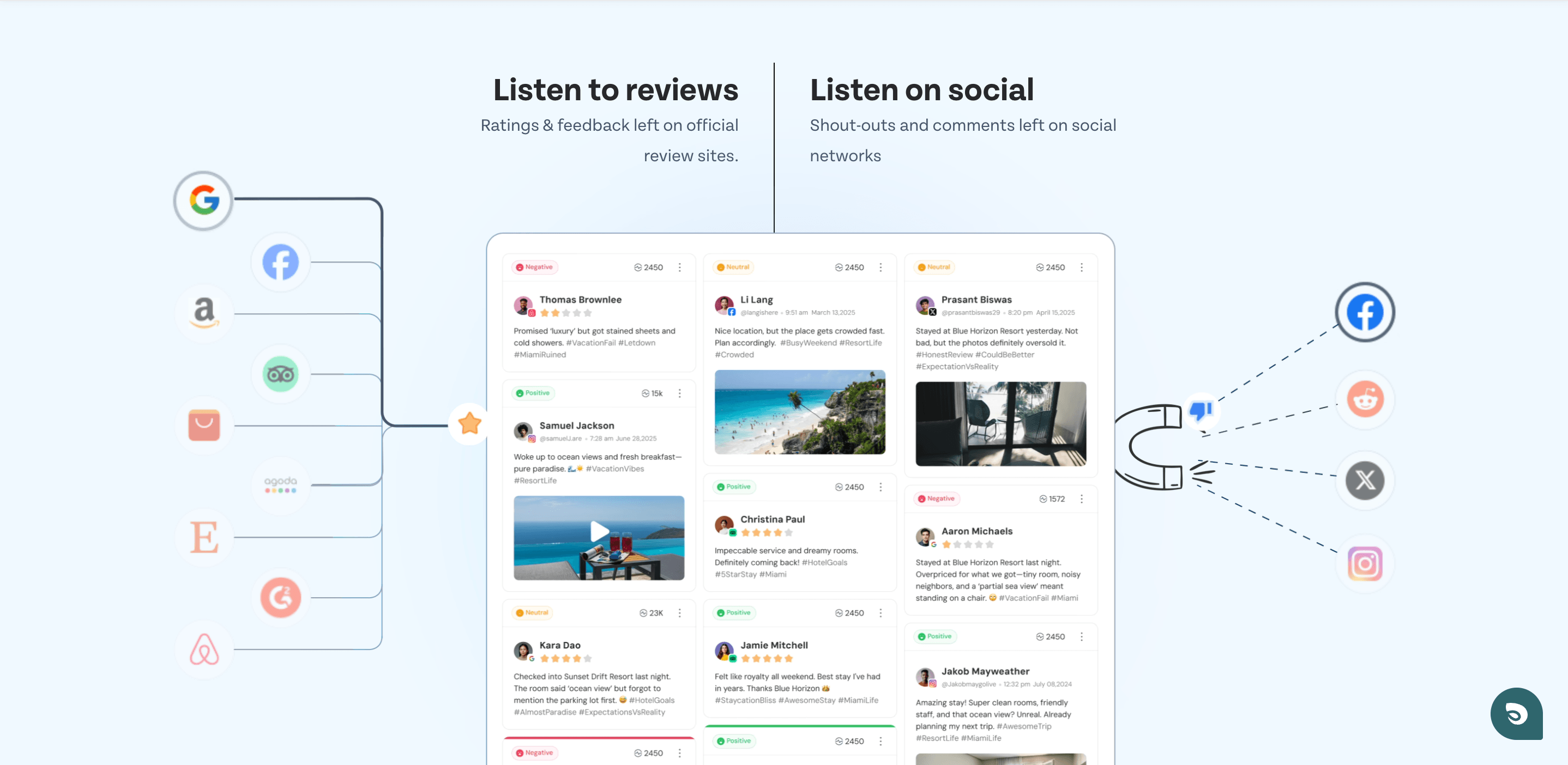
Prioritize reviews that require immediate attention, such as complaints about safety, billing errors, repeated service failures, or unresolved customer issues.
Step 3: Respond to positive and negative reviews
Responding to reviews shows current customers and potential ones that your business is paying attention, and is keen on providing a good customer service. Make your replies timely, professional, and relevant to the specific feedback.
For positive reviews, thank the customer and acknowledge what they appreciated. For negative reviews, recognize the problem, apologize when appropriate, and explain the next step.
For example:
Positive review: "The team helped me set up everything quickly. Great service!"
Response: "Thank you for sharing your experience! We're glad our team could help you get started quickly."
Negative review: "I had to contact support three times to resolve a billing issue."
Response: "We're sorry you had to follow up multiple times to get this resolved. That's not the experience we want you to have. Please contact our support team so we can look into the issue."
Avoid arguing with reviewers or sharing personal and account information publicly. If a complaint requires detailed investigation, move the conversation to a private channel while keeping your public response professional.
Step 4: Encourage customers to leave honest reviews
A steady flow of genuine reviews gives prospective customers a more current picture of your business.
Ask customers for feedback after meaningful interactions, such as a completed purchase, a service appointment, or a resolved support request. You can send an email, share a review link, or use a QR code where appropriate.
Make the request simple and avoid pressuring customers to leave positive reviews.
Google and many other platforms prohibit incentives offered in exchange for reviews, review changes, or review removals. Follow each platform's policies and applicable local regulations.
But that doesn't mean you should completely refrain from incentivized reviews. In fact, incentives are a great way to boost the volume of reviews a business gets, provided they follow rules and other legal guidelines.
Don't as for 5 star-reviews always. It can be positive, negative, or neutral.
Clearly disclose that a review was incentivized.
Don't just ask your happy customers to leave a review. Ask every customer regardless of their satisfaction levels. Review gating is heavily frowned upon and can result in account termination and bans.
Get reviews from actual customers only. Read more about customer testimonial best practices on The Federal Trade Commission.
Common incentive options in exchange for a review are:
Gift cards
Goodies
Early access to upcoming features
Free products
Monetary gifts
Special discounts and offers
Loyalty points
Step 5: Analyze recurring feedback
Don't stop at responding to individual reviews. Look for repeated themes across customers, locations, products, and time periods.
Track issues such as:
- Frequently mentioned product defects
- Long waiting or delivery times
- Poor customer support experiences
- Confusing policies or instructions
- Repeated praise for specific products or employees
You can then share these findings with the teams that can address them. CogniVue helps you do just that. It can collate reviews into one place and organize them by themes making it easier to find and respond to recurring feedback.
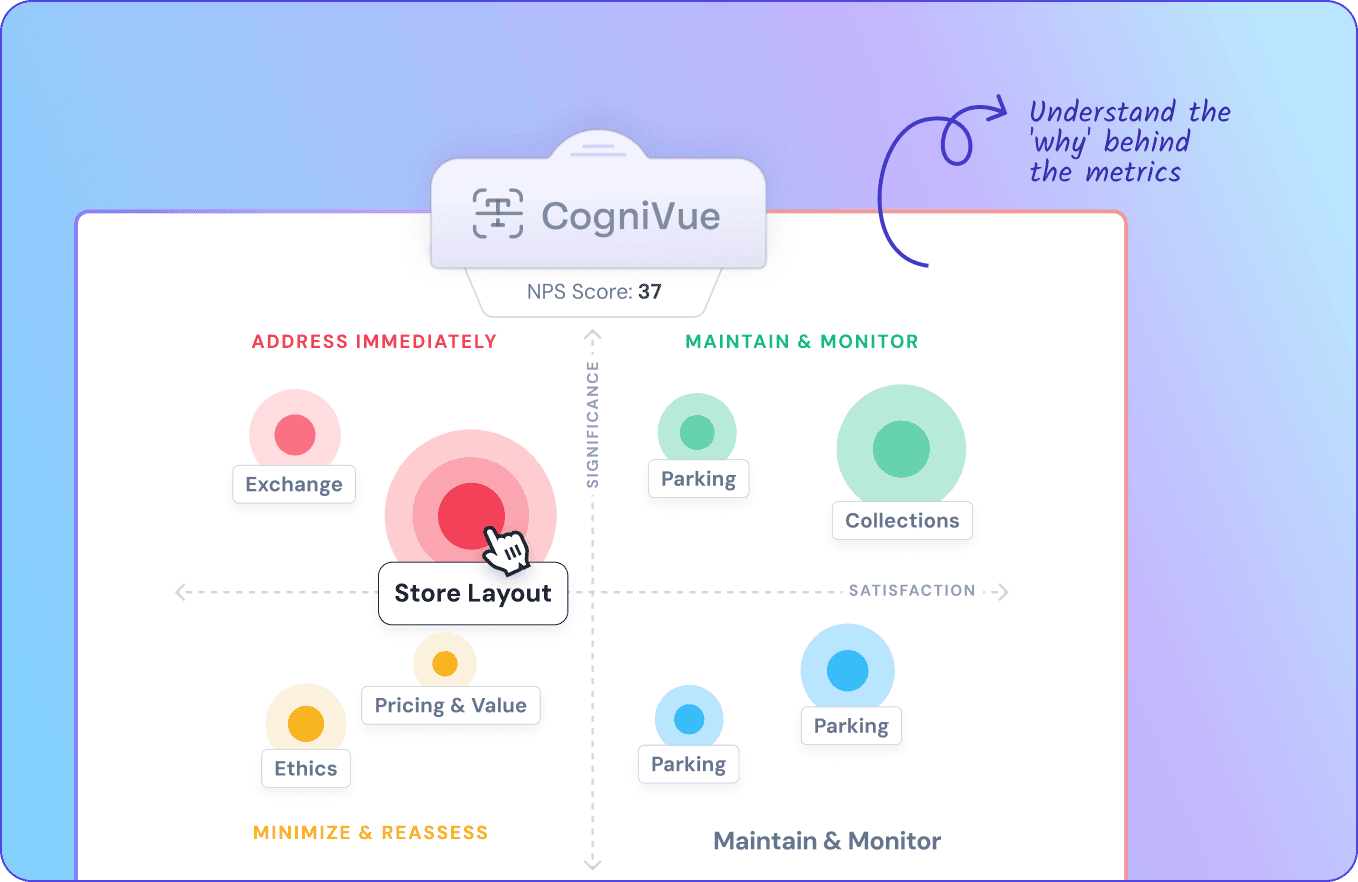
When you scale your business, the number of reviews it receives will increase as well. Automating responses to these reviews can help you save time and effort in review management.
Pro Tip: Compare feedback over time to see whether changes are improving the customer experience.
What if you already use automation to request reviews?
If your review management platform sends review requests only to customers who give positive feedback in a survey, you need to change that workflow. This practice, known as review gating, selectively encourages happy customers to leave public reviews while keeping unhappy customers out of the process. Instead, trigger review requests based on a neutral milestone, such as a completed purchase or delivery, and send them to all eligible customers regardless of their survey scores. You can still use survey responses to identify dissatisfied customers and flag issues for your support team to resolve privately.
You don't have to give up automation to do this. Configure your platform to send the same review request by email or SMS to every eligible customer, with a link to your public review page. You can also include a customer support link in the message so anyone experiencing a problem can reach your team. Keep the two options available to everyone, rather than using sentiment scores to decide who sees the review link. This lets you collect honest public feedback while using survey data to improve customer experiences.
This way, you’re not gating anybody, providing an equal chance for everyone to provide a review.
With SurveySparrow, you can automate this workflow so customers receive a follow-up message after completing a feedback survey.
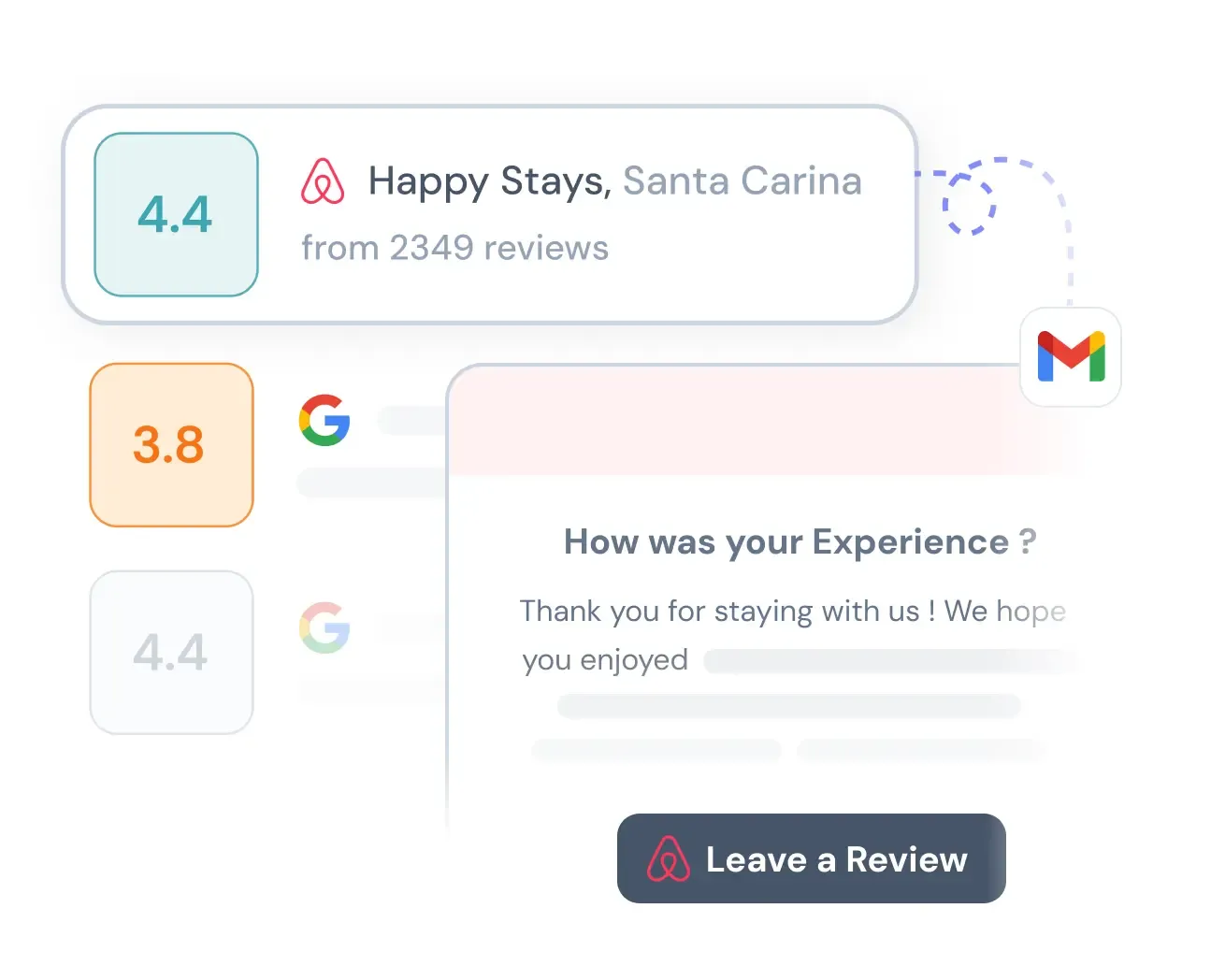
The message above thanks them for their input, offers a way to contact support, and gives them the option to share an honest public review.
Here's a hypothesis worth testing: when frustrated customers see a clear way to get help alongside a public review link, some may choose to contact support first. This gives your team an opportunity to understand the problem and resolve it before it escalates. Depending on the situation, you could offer a replacement, a discount, or loyalty points as a goodwill gesture.
This approach doesn't guarantee that customers will avoid leaving negative reviews. Instead, it gives your business a chance to address their concerns while allowing every customer to share their honest experience publicly.
Step 6: Measure the performance
Keeping track of a few metrics will help you understand whether your review management process is working as you intended.
Don't judge success by star ratings alone. A business may have a strong average rating while receiving repeated complaints about the same issue. Best practice is to combine review metrics with operational data and customer feedback to understand what needs to change.
Selecting review management software
Review management software helps businesses monitor reviews, manage responses, and analyze customer feedback from one place. It can be especially useful when you manage multiple platforms, locations, or large volumes of reviews.
The right tool depends on your review volume, budget, team structure, and reporting needs.
1. Check platform coverage
Start with the review sites that matter to your business. Some tools focus on local listings and Google reviews, while others support a wider range of consumer, travel, app, and B2B review platforms.
Confirm which platforms the software actually supports, including whether it can monitor reviews, send alerts, and let your team respond directly.
2. Look for centralized review monitoring
A centralized dashboard makes it easier to see new reviews without opening each platform separately.
Look for features such as real-time or frequent notifications, filters by rating or location, review assignment, and a shared inbox. These are particularly helpful when multiple people manage customer feedback.
3. Evaluate response management features
The software should make it easy to reply to reviews consistently and quickly.
Useful features include saved response templates, team assignments, approval workflows, and response-time tracking. If AI-generated replies are available, check whether your team can edit and approve them before publishing.
Automation should reduce repetitive work without making your responses sound generic.
4. Review analytics and reporting
Look for reporting that helps you understand more than your average star rating.
Sentiment analysis, topic categorization, location-level comparisons, and trend reports can help your team identify recurring problems. If you operate several locations, make sure you can compare performance across them.
5. Check integrations and workflows
Consider whether the software works with your existing customer support, CRM, business listing, or customer feedback systems.
Integrations can help teams connect public reviews with support tickets or other customer feedback. However, check the available integrations and data flows before committing to a plan.
6. Compare pricing and scalability
Compare plans based on the number of locations, supported platforms, users, review volume, and advanced features.
A small local business may only need review alerts and response management. A large brand may need multi-location reporting, role-based permissions, approval workflows, and deeper analytics.
Ask for a trial or demo where available. Test the workflows your team will use every day before making a decision.
What are the top review management tools for local businesses?
There is no single best tool for every local business. Your shortlist should reflect the platforms you use, how many locations you manage, and how much help you need with monitoring and responding.
Here are some options to evaluate:
- SurveySparrow: Connect customer feedback surveys with automated review requests. Collect feedback, identify service issues, and follow up with customers to improve their experience while encouraging honest public reviews.
- Birdeye: Worth evaluating for businesses looking for review management and broader reputation tools.
- Podium: Worth considering if your business wants to connect customer messaging with review-generation workflows.
- Yext: An option to explore when business listings and location data are important alongside reviews.
- Reputation: Worth evaluating for multi-location reputation management and customer experience reporting.
- ReviewTrackers: An option to compare for centralized review monitoring and feedback analytics.
- Trustpilot: Relevant for businesses that want to build and manage their presence on Trustpilot's review platform.
For a small business with one location, a well-maintained Google Business Profile and a simple review-monitoring routine may be enough to start. Consider paid review management software when manual monitoring becomes difficult or you need better reporting and team coordination.
Analyzing and Leveraging Review Data
The true value of customer reviews goes beyond just collecting them. Raw review data holds hidden insights that can turn your business review management strategy into a real competitive edge.
Extracting customer sentiment from unstructured data
Review content comes in as unstructured data—free-form text that doesn't fit into neat categories. Your analysis should start with a clear goal. To name just one example, a social-first approach to sentiment means you should focus on campaign-specific words rather than all feedback.
Sentiment analysis offers a practical way to classify text as positive, negative, or neutral. This method gives values to phrases (+1 for positive words, -1 for negative, 0 for neutral). The result is structured numeric data from plain text. This technique reveals valuable insights about your customers' attitudes toward products and services.
Spotting trends and recurring issues
AI-powered text analytics helps you see patterns you might miss otherwise. AI word clouds quickly show emerging consumer trends with high accuracy. Grouping comments by topic shows common themes—both product problems and service strengths.
To name just one example, restaurant owners found repeated complaints about slow service in their reviews. They responded by adding staff during rush hours, which improved customer satisfaction. On top of that, it helps to track keywords over time to see how customer opinions change after business improvements.
Using reviews in marketing and social proof
Reviews serve as powerful social proof—showing that others trust your business. The numbers speak for themselves: 86% of businesses consider verified reviews critical in their purchase decisions. This explains why reviews have become such strong social proof tools in today's social media landscape.
Smart ways to make use of reviews include:
- Embedding reviews directly on your website through review widgets
- Creating dedicated sections for customer success stories
- Turning reviews into marketing materials using tools like Google My Business Marketing Kit
Measuring performance across locations
Business owners with multiple locations need good performance context. Internal comparisons look at metrics between different units in your organization. External measurements stack your performance against competitors.
Performance measurement looks at hard numbers, while practice assessment digs into how activities happen. These approaches work together to give detailed insights into how different locations stack up.
The point of analyzing review data isn't just to understand the past. It helps predict future trends and lets you take action to shape better customer experiences.
Where do customers leave reviews? Key places
Customers use different review platforms depending on what they're buying and how they discover businesses. Focus on the platforms that influence your customers' decisions rather than trying to maintain every possible profile.
The platforms listed above serve different audiences, so prioritize them according to your industry. Also monitor relevant marketplaces or specialist review sites if customers use them to evaluate your products or services.
Keep your business information accurate on each platform, assign ownership for monitoring, and use a consistent approach to responding to reviews.
How AI helps enhance review management
AI helps businesses process large volumes of customer reviews faster. It can summarize feedback, identify patterns, classify sentiment, and assist with response writing.
Here are four ways to use AI in review management.
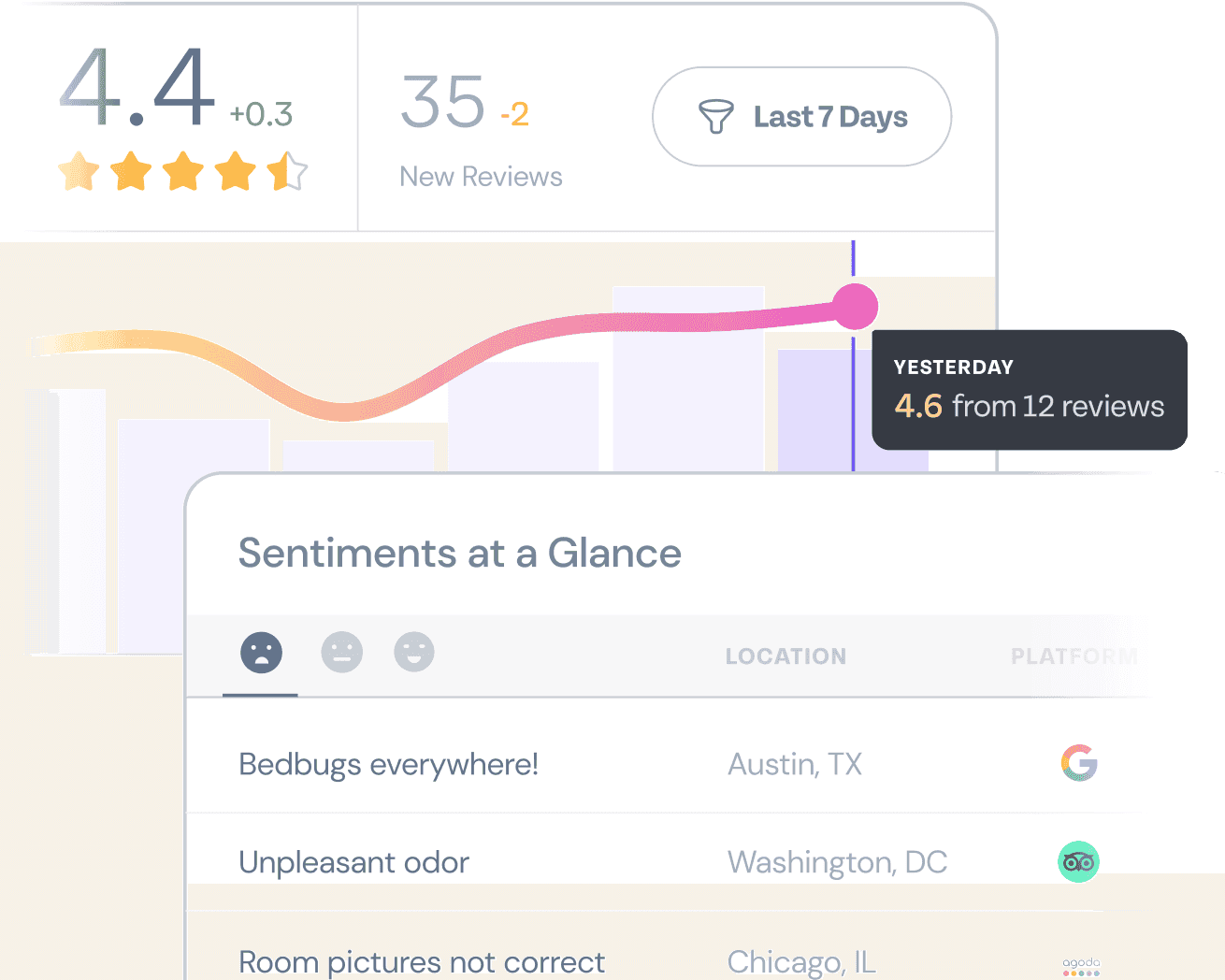
1. Analyze sentiment at scale
AI can classify reviews by sentiment and help teams identify changes in customer opinion.
For example, a hotel might receive hundreds of reviews across its locations. AI can help group all those responses into positive or negative themes.
Sentiment classifications aren't always accurate, especially when reviews contain sarcasm or mixed opinions. Use them to guide analysis rather than treating every classification as fact.
2. Identify recurring themes
Like we discussed earlier, AI can group reviews by topic, making it easier to spot patterns (or recurring themes) across large datasets.
Instead of reading hundreds of comments individually, a team can review summaries of common themes, such as delivery delays, product quality, or support responsiveness.
Recurring themes could either be positive or negative. For example, repeated complaints about parking or the customer service at a restaurant will appear by topic and as high-priority fixes.
This helps managers prioritize issues that affect multiple customers or locations.
3. Draft review responses
AI tools can generate response drafts based on a review's content and your preferred tone.
For example, AI can draft a polite reply to a customer who reports a delayed order. A team member can verify the details, personalize the response, and make sure it doesn't promise something the business cannot deliver.
Use human review for sensitive complaints, legal concerns, safety issues, and cases involving personal information. Don't let automation publish inaccurate or inappropriate responses.
4. Detect changes and prioritize urgent feedback
AI-assisted monitoring can flag sudden increases in negative sentiment or repeated complaints about the same issue.
A retailer might notice a spike in reviews mentioning damaged packaging after a change in its delivery process. The team can investigate the cause before the issue affects more customers.
AI works best when it helps teams prioritize and act. It cannot replace a clear escalation process or the operational changes needed to resolve customer problems.
The easy way to track online reviews
The easiest way to track online reviews is to centralize monitoring, automate alerts where possible, and give your team a simple process for handling feedback.
You can start with a lightweight system before investing in dedicated software.
For businesses with one location:
- Claim and verify your Google Business Profile.
- Identify other review platforms relevant to your industry, and note them.
- Schedule a regular time to check new reviews on those platforms.
- Assign a reputation manager to respond to complaints and questions.
- Record recurring issues in a simple spreadsheet.
For businesses with multiple locations:
- Use a review management platform that supports your locations and key review sites.
- Set alerts for new reviews and urgent complaints.
- Assign reviews to the relevant location manager or support team.
- Create response guidelines and escalation rules.
- Review location-level trends in a weekly or monthly report.
You can track basic metrics in a spreadsheet, including the review date, platform, rating, feedback theme, response status, and resolution status.
As your review volume grows, consider software that combines monitoring, response management, and analytics in one dashboard. This reduces manual work and makes it easier to spot problems across locations.
Google Alerts is a free way to start tracking your brand, but it covers only public web pages and news. It misses most social media conversations, review sites such as Google Business Profile and Yelp, and non-English content, and its notifications can arrive hours or days late.
Dedicated monitoring tools fill those gaps.
Mention.com tracks brand mentions across the web and social media with AI sentiment scoring, which suits small and midsize businesses.
Syften focuses on community conversations on sites such as Reddit and Hacker News, while Brandwatch offers enterprise-level social listening across a wide range of channels.
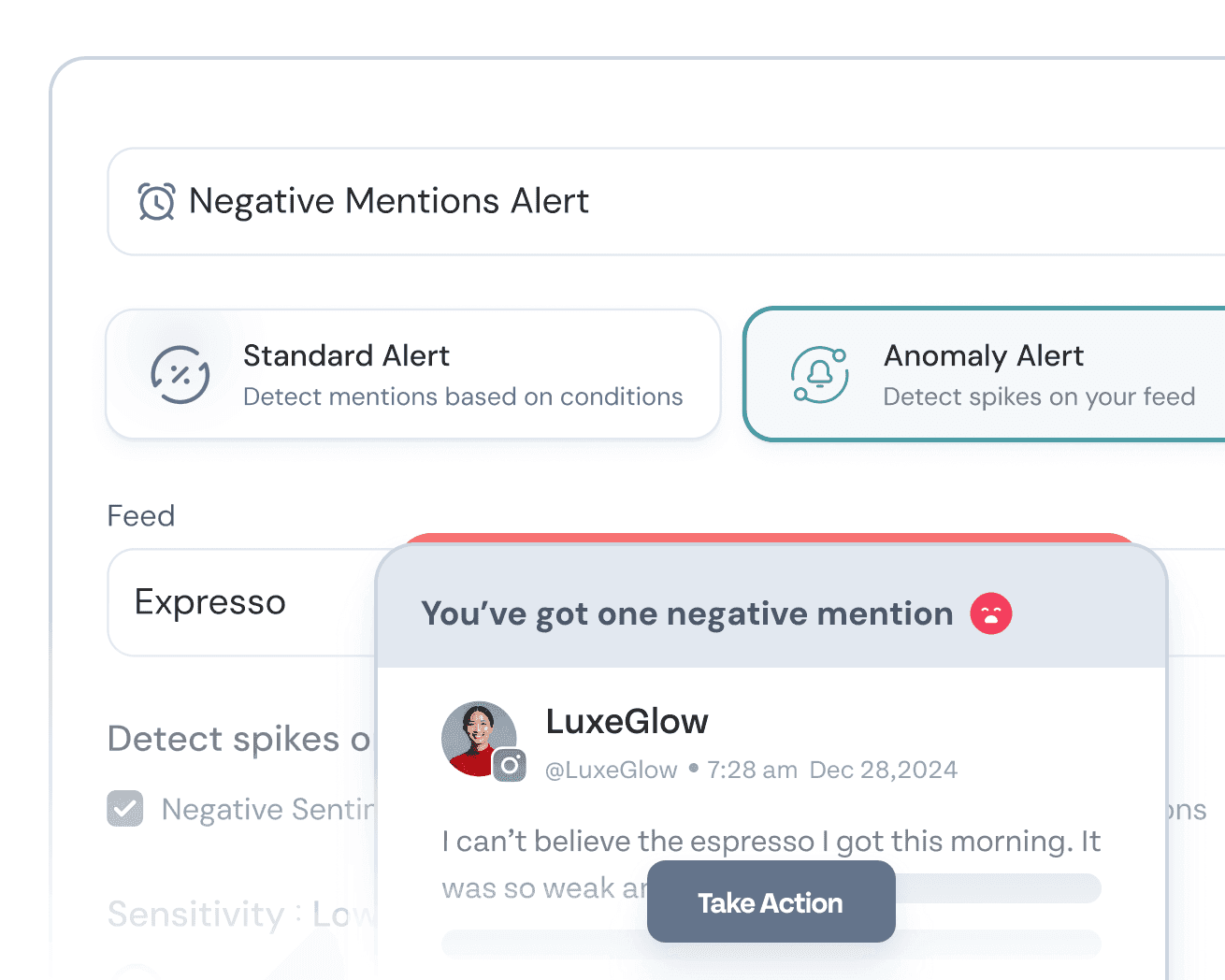
SurveySparrow covers the review side, sending alerts when new reviews appear across sites such as Google and Facebook, so your team can respond before a complaint spreads.
Best practices for managing online reviews
A good review management process depends on consistency, authenticity, and follow-through. These practices can help you build a system that works over time.
1. Be responsive to customers
Responsiveness is one of the most important habits in review management. Customers want to know that someone has read their feedback and will take their concerns seriously.
A prompt response can also help prospective customers understand how your business handles problems. This is especially important when a review describes a service failure that other buyers may worry about.
Set a response-time target that fits your business and the urgency of the issue. For example, you might aim to acknowledge negative reviews within one business day and handle urgent complaints sooner. Make sure someone is responsible for meeting that target.
Responsiveness also matters when you're choosing review management software. Many leading platforms offer features such as review alerts, centralized inboxes, response templates, and team workflows because businesses need a reliable way to keep up with customer feedback. These features help teams respond consistently, but the software alone won't build a good reputation. Your team still needs to provide useful answers and resolve the underlying issues.
2. Respond to negative reviews without getting defensive
A negative review can feel personal, especially when you believe the complaint is unfair. However, a defensive response can make the situation worse.
Acknowledge the customer's concern, explain what you can do to help, and invite them to continue the conversation privately when necessary. If the review contains a factual error, correct it calmly and provide relevant information without revealing private details.
If the review violates the platform's policies, use the official reporting process. Don't assume a review will be removed simply because you disagree with it.
3. Personalize your responses
Avoid using the same generic reply for every customer. Templates can save time, but each response should acknowledge the specific experience described.
If a customer praises your delivery team, mention the delivery experience. If someone reports a billing problem, address the issue and explain the next step.
A little context makes your response more useful to the reviewer and to anyone else reading it.
4. Never buy or fabricate reviews
Fake reviews can damage customer trust and violate platform policies or applicable laws.
Ask customers for honest feedback without requiring a positive rating. Avoid paying for reviews, suppressing genuine negative feedback, or offering incentives in exchange for reviews where prohibited.
A credible profile should reflect real customer experiences, including criticism your business can learn from.
5. Turn review feedback into action
Responding to a review is only part of the process. If customers repeatedly report the same issue, investigate and fix the underlying cause.
Share relevant feedback with product, operations, sales, or customer support teams. Track whether the issue becomes less frequent after you make a change.
When appropriate, let customers know that you've addressed the problem. This closes the loop and shows that their feedback can lead to meaningful improvements.
6. Keep your review management process consistent
Assign clear ownership, set response guidelines, and schedule regular reviews of your performance.
For businesses with multiple locations, define which issues local teams can handle and which require escalation. Keep response guidelines flexible enough for employees to personalize replies.
Review your metrics regularly and update your process as your business grows.
Make customer feedback more useful
Managing online reviews helps you understand what customers say publicly about your business. The next step is to connect those comments with feedback from surveys, support conversations, and other customer touchpoints.
With a structured feedback management process, you can identify recurring issues, prioritize improvements, and track whether changes lead to better customer experiences.
Explore SurveySparrow's customer feedback management guide to learn how to build a process that turns customer opinions into actionable insights.
Recommended reading
Review management is one part of a broader customer feedback process. These resources can help you understand how to collect feedback and turn it into improvements.
- What is customer feedback management? Importance, process, and best practices — Learn how to collect, organize, analyze, and act on customer feedback.
- Google's guide to getting more reviews — Review Google's guidance on requesting genuine reviews and responding to customers.
- Google's guide to managing customer reviews — Learn how to read, reply to, and report reviews on your Business Profile.
Start with SurveySparrow’s review management tool—it brings all your feedback into one place, automates responses, and helps you stay on top of every customer interaction.